
Available on: ❌ Lite ❌ Core ❌ Plus ✅ Enterprise
CONTRACTOR INDUCTIONS
What are Induction Files?
Induction files are documents or videos that contractors are required to review before they are permitted to sign in to a site. These files communicate important information about your organisation, site-specific requirements, and health and safety expectations, ensuring contractors understand their responsibilities before commencing work.
Common examples of induction files include:
- Site induction presentations
- Health and Safety policies
- Emergency procedures and evacuation information
- Site rules and code of conduct
- PPE requirements
Why are Induction Files Important?
Uploading induction files helps ensure that every contractor receives consistent and up-to-date information before accessing your site. This process supports compliance with workplace health and safety requirements while reducing the risk of incidents caused by contractors being unaware of site rules or procedures
Benefits of using induction files include:
- Ensures contractors are informed of site-specific rules and expectations.
- Promotes compliance with workplace health and safety obligations.
- Provides a standardised induction process for all contractors.
- Allows induction material to be easily updated, ensuring contractors always receive the latest information.
Completing a site induction is a vital step in maintaining a safe work environment for all employees. Inductions can be delivered in various formats, but they must be completed before anyone is permitted to sign onto site as a Contractor Employee within SecurePass
What are the requirements before a Contractor Employee can complete an Induction within SecurePass?
Before a Contractor Employee can complete an Induction within SecurePass, there is a series of requirements that must be met.
This includes.
-
A Valid Contractor Management subscription. SecurePass locations that have only purchased a Visitor Management subscription cannot upload Contractor-related induction files or questions. If you would like to discuss a Contractor Management package, please feel free to contact us via this link - https://healthsafe.co/contact-healthsafe
-
An Active Contractor Employee Profile - Before a contractor employee can complete an induction for a SecurePass site, they must first be added to their contractor business profile as an employee.
For step-by-step instructions on how to add employees to a contractor business, please refer to this help centre article. - Note this can only be done by a Contractor Business Admin or System Admin, not an Employee.
If this has not been done, the employee will not be able to register themselves on the Contractor Management Application and complete a contractor induction.
For a step-by-step on how to register on the Contractor Management Application and for how a Contractor Employee can complete an induction. Please view the articles below.
How to upload a Contractor Induction File within SecurePass.
Uploading a Contractor Induction File is a quick and easy process, but needs to be done to each SecurePass location with the Valid Contractor Management Subscription individually and can ONLY be uploaded a System Admin
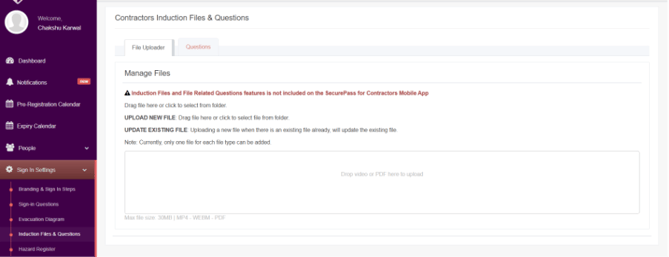
- Navigate to Sign In Settings > Induction Files & Questions.
- Ensure you are on the File Uploader tab.
- Click within the upload box to browse and select a file from your computer.
- Supported file types include PDF, MP4, and WEBM, with a maximum file size of 30 MB.
- Once the file is uploaded, it will automatically be saved and made available as an induction document.
- If a file of the same type already exists, uploading a new file will automatically replace the existing one with the new version.
- Repeat the process for any additional induction files you wish to upload (one file per file type is supported).
How to Create Induction Questions?
Like an annual induction file for contractors, System Admins within SecurePass can also added inducation related questions.
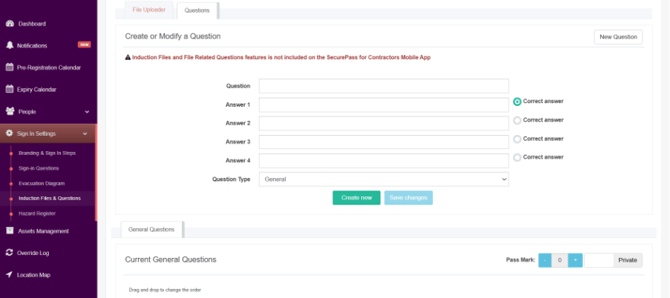
- Navigate to Sign In Settings > Induction Files & Questions.
- Select the Questions tab.
- Click New Question to create a new induction question.
- Enter the question in the Question field.
- Add up to four possible answers in the Answer fields.
- Select the radio button next to the correct answer.
- Choose the appropriate Question Type from the drop-down menu.
- Click Create New to save the question.
- The new question will appear in the Current General Questions section below, where it can be edited or reordered if required.
Use the Pass Mark controls to set the minimum number of correct answers required for contractors to complete the induction. You can also choose whether the questions are Private or visible to contractors, depending on your organisation's requirements.
If the Questions are toggled to Public, they will be visible to your Contractors. If it's set to Private, they will not
What are Induction questions?
Induction questions are presented to contractors after they have viewed your induction file. Their purpose is to verify that contractors have read, understood, and retained the important information provided during the induction process before they are granted access to your site.
These questions act as a knowledge check, helping to ensure that contractors understand your site's safety requirements, policies, procedures, and expectations. By requiring contractors to answer these questions correctly, organisations can be more confident that the induction has been completed effectively rather than simply viewed.
Induction questions can be tailored to cover topics specific to your organisation, such as:
- Health and Safety requirements
- Emergency procedures
- Site rules and restricted areas
- Personal Protective Equipment (PPE) requirements
- Environmental or quality procedures
- Any other information contractors must understand before commencing work
What's next?
Now that you have uploaded your contractor induction file and questions. Several addtional steps need to be completed to get Contractor Management up and running within SecurePass.
This includes, but is not limited to.
- System Admins, establishing the mandatory document requirements that Contractor Businesses and Employees must meet to sign on - How to create a contractor business type
- System Admins, creating Contractor Businesses within SecurePass and Inviting Contractor Business Admins into the System - How to invite a Contractor Business Admin into SecurePass
- System Admins, creating the sign-in steps for Information that needs to be visible to Contractors when they sign into a SecurePass location - Explore the Sign In Settings
- Contractor Business Admins - Uploading and adding their employers and required documents into the system - How to add business requirements and contractor employees into SecurePass
For further assistance or questions regarding SecurePass, please contact our support team or Submit a support ticket (healthsafe.co.nz).